Showing posts with label Blogspot - How to. Show all posts

Picture in Blogger Post

Posted by Planeta Srbija | 20.7.11 | | 6 comments »

On Macro of micro I've found a script which makes it possible to publish picture within a Blogger post. To use it, you need to add this javascript to your blog template (place the below codes in your blog template design- Edit HTML just above </body> tag):

<script src='http://hosting.gmodules.com/ig/gadgets/file/105066904960012479556/nccode.js' type='text/javascript'/>

To insert it use this tag:
[im]your image url[/im]
eg: [im]http://website.com/folder/image.jpg[/m]

Read More......

This solution is placed outside of this blog but a great one!

LINK: Bloggersentral

Read More......

Blogger shows by default 20 posts per page when you click specific label from your labels widget. But maybe you want to show less because page loads too long... or you want to show maximum (which is 100)?!

Go to Dashboard > Layout > Page Elements > Edit Html > Expand Widgets

Search for this:

<a expr:dir='data:blog.languageDirection' expr:href='data:label.url'>
<data:label.name/>
</a>
</b:if>
<span dir='ltr'>(<data:label.count/>)</span>


And replace it with this:

<a expr:dir='data:blog.languageDirection' expr:href='data:label.url + "?max-results=5"'>
<data:label.name/>
</a>
</b:if>
<span dir='ltr'>(<data:label.count/>)</span>


Note: the red "5" determins number of your posts before Blogger shows "Read older posts" link. It could be anything between 1 and 100.

Read More......

Customize your Blogger RSS feed

Posted by Planeta Srbija | 26.5.10 | | 5 comments »

Well, yes, you can use RSS feed as a method to backuup your texts and immages on your blog. It's not a bad idea especially if you host your pictures on free web hosts (and the can get lost).

By default, Blogger sends latest 25 posts in your blog feed, and it looks like:
http://YOURBLOGNAME.blogspot.com/feeds/posts/default

Change this address in your browsers address bar to:
http://YOURBLOGNAME.blogspot.com/feeds/posts/default?max-results=500
(NOTE: maximum number of posts to appear in your feed is 500)

Now you can save all of your 500 posts with pictures!

Read More......

If your blogger template doesn't show links for "older posts" and "newer posts" find this line of code:

#blog-pager-newer-link {
float: left;
display:none;
}
#blog-pager-older-link {
float: right;
display:none;
}

and just delete the red part (display:none;)

There is a hack if somehow this still doesn't work:
Insert clear:both; code so the code will be look like this


#blog-pager {
text-align: center;
clear:both;
}

Read More......


When you use this hack,you will see this kind of navigation on your blog’s home page and label pages(needs little customization).
Implementation of Blogger Page Navigation... Read more LINK 1 and LINK 2

Read More......

By default, label pages display 25 posts assigned to that particular category (if there are enough posts filed under that label).

For those who write long posts or use many images, this can result in long page-load times for label-based blog pages.

Here is an easy way to limit the number of posts displayed on label pages:

1. Go to Layout>Edit HTML in your Blogger dashboard and ensure you have checked the “Expand widget templates” box.

2. Using the search function of your browser, find every instance of this phrase:

data:label.url

and replace this with the following line:
data:label.url + "?max-results=X"

where X is the number of posts you would like to display on labels pages. This can be any number between 1 and 100.

Credits: www.bloggingtips.com

Read More......

Add Popular Posts to blogger

Posted by Planeta Srbija | 23.8.08 | | 0 comments »

As you my have noticed, I'm pretty much against free widgets spread over the internet because they are not relyable. There is much easier way to publics popular posts on your blog (criteria is post with most commets).

Go to your Layout tab / Page Elements, click on Add a Gadget, and then choose "Feed". Put inside following:
http://pipes.yahoo.com/pipes/pipe.run?_id=1cf38ae68efbe859c4ba1ee239cec099&_render=rss&num=50&url=http%3A%2F%2FYOUR-URL-HERE
Name it something like "Popular Posts" (or whatever). Save everything!

1) Make sure you did not entered your URL starting with "http://" (because there is allready one at the beginning) Just put after "F" yor blog name like:
my-web-solutions.blogspot.com

2) Make also sure your "Comment Feed" is not set to "None" (Settings/Site Feed).

3) Sometimes, if it doesn't work, for a couple of minutes (hours) - it will come up! But when it does, it will work perfectly!

Enjoy!


Read More......

Add Recent Comments to blogger

Posted by Planeta Srbija | 23.8.08 | | 0 comments »

You want Recent Comments on your blog? Like a widget on your sidebar? It's pretty simple. I suggest you don't use some widgets on the internet because they are not very reliable. Today they work fine, tommorow they are gone! Instead of that you can use a simple trick: use blogger feed service!

Go to your Layout tab / Page Elements, click on Add a Gadget, and then choose "Feed". Put in the following path:
http://YOURBLOG.blogspot.com/feeds/comments/default
Name it something like "Recent comments" (or whatever). Save everything! Enjoy! If comments don't show up, make sure you did not entered twice "http://" (because there is already one tipped by default), check if the feed is working by enetring the same link into your internet browser. If everything is OK, then relax for a couple of minutes (hours) - it will come up! But when it does, it will work perfectly!

If you use custom domain, use following path:
http://www.YOURDOMAIN.XXX/feeds/comments/default

By the way, if you want "Recent Posts" in your sidebar, use the same procedure and following path:
http://YOURBLOG.blogspot.com/feeds/posts/default
or for custom domain:
http://www.YOURDOMAIN.XXX/feeds/posts/default

Read More......

Searching for an ideal template for your blog on Blogspot you might have expirienced that many of them, especially those "sofisticated" ones have some elements which can not be removed. Usually, it´s the search bar or "subscribe field" or something like that. But many of us feel more confortable with adding elements we like as a wigdet to the sidebar (like I did with the search field on this website).


Beside of the estetic issue of this problem there are also some financial aspects you might think about when changing fixed elements. For example, you might be an AdSense subscriber and using the Google search bar could bring more benefits than using built-on search. So, how can we do it? It´s pretty simple:

Go to your Layout tab and then to Edit HTML. Use search funciton of your browser (Ctrl+F) and look up to string which has locked='true' in it, followed by title='Header Ad Banner' (or whatever). If this title correspodents to the page element you want to get rid of, change locked='true' to: locked='false'. Save your changes to HTML. Now, go to Layout/Page Elements, click to Edit link of yor element and now you will get "Remove element" option visible! Remove it and enjoy!

Read More......

Remove Navbar from Blogger

Posted by Planeta Srbija | 19.6.08 | | 0 comments »

After you register at Blogger there is usually on top of your page a small navigation toolbar, also known as Navbar. At first I thought it must be there. And than, I've seen so many bloggs without it?! Many of custom themes doesnt have it. This made me take a closer look at Terms of use. I didn't find anything dealing with Navbar?! Unless you see something I didn't?! So, if you have a nice theme and you use a nice banner in your header, you might like to remove this thing.


To do that, go to Settings/Edit HTML, and somwhere on top find and insert into your template the red marked piece of code:

<head>
<b:include data='blog' name='all-head-content'/>
<title><data:blog.pageTitle/></title>
<b:skin><![CDATA[/*
-----------------------------------------------
Blogger Template Style
Name: MyCustomTheme
Designer: Somebody out there
URL: http://www.planetasrbija.com
Date: 2008
----------------------------------------------- */
#navbar-iframe {
display: none !important;
}

/* Variable definitions
====================
<Variable name="mainBgColor" description="Main Background Color"
type="color" default="#fff" value="#ffffff">
.
.
.


That's it! Save your template and enjoy.

Read More......

Do you miss a beautiful option of WordPress to show only introduction to a post on a frontpage, and after that to get "read more" hyperlink which will take you to the rest - like I did it on my blog?

Well, Ramani made the perfect solution for this and he explains in his blog how to get it working. Follow his instructions exactly (like I did) and magic happens!

Read More......

Blogger, unlike WordPress, doesn´t have Categories – a kind of contents of your blog . This is very important thing because your posts should not only be ordered hronologicaly on the main page but also hronologicaly within the categories. One blog can deal with a lot of your interests (sport, music, art ...), and your visitors will love if posts are categorized.
Some time ago there was a skript for tweaking around (which never worked for me). Now, you can "Add page element" for your sidebar. Choose "Labels" and name it "Categories".

To get new Categories to shown up, after writing a post, put also "Labels" - a word which will be a "subcategory", ie: "Music" or "Sports".

Read More......

There are a couple of ways to show AdSense on your blog post:

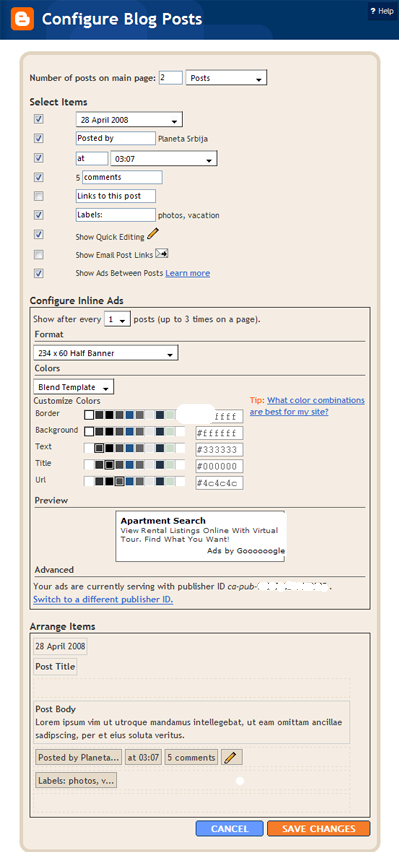
1. This is a pretty new option: in your Layout, in a Blogpost part, click on "edit" hyperlink in zhe right corner. You will see this screen:
Photobucket

Select "Show Ads between posts" - and you will get setting options for AdSense - it´s size, colors and your UserID-a. This is so simple, there is no need for further explanation.

If you still don´t have an AdSense account you can easily register using your username and password for Google (and for blogger).


2. There is also a tweaky method for inserting AdSense directly into post body. Important: Google allows not more then three AdSense units on one page, counting also those shown in your sidebar. So don´t get confused if you have a lot of post and AdSense shows only in the first 3 of them!

First you have to copy your AdSense-unit script. You will reach the best result if you choose a small unit, maybe the smallest is the best one. Then, you have to make following changes (don´t worry it´s not a real "any change of code"):

< with &lt;
> with &gt;
" with &quot;

Now, you have to insert AdSens script into your blogger template. Go to Layout/Edit HTML, and checque “Expand Widget Templates”. (this is a must!)

If you want your AdSense shows in left upper corner, put AdSense script into this place (you can search complete HTML code using Ctrl+F in your browser):

<div class='post-header-line-1'/>
<div style='float:left;margin:5px 10px 15px 20px'>
AdSense Code
</div>
<div class='post-body'>
<p><data:post.body/></p>
<div style='clear: both;'/> <!-- clear for photos floats -->
</div>


The part "float:left" can be changed to "float:right" and AdSense will show up in right corner of your post. You can also change margins to achieve the desired distance between AdSense and the rest of your post-text.

Read More......

Take a look on my other postings: