Showing posts with label Tricky. Show all posts

Sometimes the most stupid things take most of your time. It can happen when you need to enter the full path of a folder on you web server (e.g. for sheaduled backups of your MySQL Database).

I can give you a great tool for that:

1) Copy this part of code, paste it into your Notepad and save it as "path.php".

<?php
echo getcwd();
?>


2) Upload that file to a folder which full path you need.

3) Call the file thru your browser: e.g. http://www.yourdomain.com/bckp/path.php

4) That's it, you've got it!

Read More......

Random banner or header rotation

Posted by Planeta Srbija | 15.6.10 | | 1 comments »

Showing a different header or page background picture each timr the page loads can look pretty refreshing. There are milions of ways to do that, but this one is very simple and it works like a charm! Credits to: Matt Mullenweg.

1) Put all of pictures into a specific folder on your web server. They should have extension: jpg, jpeg, png or gif and apropriate dimensions.

2) Copy this code and paste it into Notepad:

<?php
/*
By Matt Mullenweg > http://photomatt.net
Inspired by Dan Benjamin > http://hiveware.com/imagerotator.php
Latest version always at:
http://photomatt.net/scripts/randomimage
*/// Make this the relative path to the images, like "../img" or "random/images/".
// If the images are in the same directory, leave it blank.
$folder = '';
// Space seperated list of extensions, you probably won't have to change this.
$exts = 'jpg jpeg png gif';
$files = array(); $i = -1; // Initialize some variables
if ('' == $folder) $folder = './';
$handle = opendir($folder);
$exts = explode(' ', $exts);
while (false !== ($file = readdir($handle))) {
foreach($exts as $ext) { // for each extension check the extension
if (preg_match('/\.'.$ext.'$/i', $file, $test)) { // faster than ereg, case insensitive
$files[] = $file; // it's good
++$i;
}
}
}
closedir($handle); // We're not using it anymore
mt_srand((double)microtime()*1000000); // seed for PHP < 4.2
$rand = mt_rand(0, $i); // $i was incremented as we went along
header('Location: '.$folder.$files[$rand]); // Voila!
?>


3) Save the document as rotate.php and upload it to the same folder with pictures.

4) In your header or wherever you want to show random pictures, put following line of code to call the rotate.php
<img src="http://www.path to folder with pictures/rotate.php" alt="A Random Image" />

Read More......

If you are getting this message:

Warning: ini_set() [ref.outcontrol]: Cannot change zlib.output_compression - headers already sent in... /home//header.php on line 2

above your header, that means that theme you are using is trying to compress output and speed your page load speed, BUT "zlib" is not enabled by your hosting provider.

Solution: open your header file (usually header.php) and just delete following code:
<?php
ini_set('zlib.output_compression', 'On');
ini_set('zlib.output_compression_level', '1');
?>


If you liked this one, you can buy a beer :-)

Read More......

Simple Rollover Effect

Posted by Planeta Srbija | 13.10.09 | | 0 comments »

The most easiest way to achieve a rollover effect without using java-script (which one part goues into page header and slows down the page loading) is this one. You can use it even in in your blogposts!

<div style="text-align: center;"><a href="#">
<img alt="Click Me" onmouseout="this.src='http://www.pic1.jpg'" onmouseover="this.src='http://www.pic2.jpg'" src="http://www.pic1.jpg" />
</a></div>


DEMO: (place mouse cursor on the gray picture)

Click Me

Read More......

It's pretty easy one: you need to upload your .swf file to your server or somwhere else, but you need to know the link to it! Open the text widget in your WordPress and put this code into it:


<div align="center"><embed wmode="transparent"
src="http://www.your-web-site/../your-file.swf"
quality="high" pluginspage="http://www.macromedia.com/go/getflashplayer" type="application/x-shockwave-flash"
width="size in pix" height="size in pix"></embed></div>

Of course, insert the correct path to the file and desired dimensions (red part of code)

Read More......

PNG transparency in IE

Posted by Planeta Srbija | 7.11.08 | , | 2 comments »

If you want PNG pictures to have transparency on your web page, use this simple method:

1) Copy this code and paste it into yout notepad:

/*

Correctly handle PNG transparency in Win IE 5.5 & 6.
http://homepage.ntlworld.com/bobosola. Updated 18-Jan-2006.

Use in <HEAD> with DEFER keyword wrapped in conditional comments:
<!--[if lt IE 7]>
<script defer type="text/javascript" src="png.js"></script>
<![endif]-->

*/

var arVersion = navigator.appVersion.split("MSIE")
var version = parseFloat(arVersion[1])

if ((version >= 5.5) && (document.body.filters))
{
for(var i=0; i<document.images.length; i++)
{
var img = document.images[i]
var imgName = img.src.toUpperCase()
if (imgName.substring(imgName.length-3, imgName.length) == "PNG")
{
var imgID = (img.id) ? "id='" + img.id + "' " : ""
var imgClass = (img.className) ? "class='" + img.className + "' " : ""
var imgTitle = (img.title) ? "title='" + img.title + "' " : "title='" + img.alt + "' "
var imgStyle = "display:inline-block;" + img.style.cssText
if (img.align == "left") imgStyle = "float:left;" + imgStyle
if (img.align == "right") imgStyle = "float:right;" + imgStyle
if (img.parentElement.href) imgStyle = "cursor:hand;" + imgStyle
var strNewHTML = "<span " + imgID + imgClass + imgTitle
+ " style=\"" + "width:" + img.width + "px; height:" + img.height + "px;" + imgStyle + ";"
+ "filter:progid:DXImageTransform.Microsoft.AlphaImageLoader"
+ "(src=\'" + img.src + "\', sizingMethod='scale');\"></span>"
img.outerHTML = strNewHTML
i = i-1
}
}
}


2)Save this file as: png.js and put it somwhere on your website. For example in root.

3) Put on each page of your website which should show transparent PNGs somewhere within <head> section this code:

<!--[if lt IE 7.]>
<script defer type="text/javascript" src="png.js"></script>
<![endif]-->

Read More......

Script Outside Page Source

Posted by Planeta Srbija | 21.10.08 | , | 1 comments »

If you'd rather like to have your page source as clean as possible then you want to keep your scripts separately.

1. Make a folder and name it like "scripts" (or whatever).
2. Take the scriptcode and paste it in notepad! For example it looks like:

<script type="text/javascript">
function nextQuote(){
var result = new Array(6);
result=jsonrpc.slideQuotes.getNextQuote();
document.getElementById('quoteBody').innerHTML=result[0];
document.getElementById('quoteHeading').innerHTML=result[1];
document.getElementById('quotePrevious').innerHTML=result[4];
document.getElementById('quoteNext').innerHTML=result[5];}
</script>


Delete the red part and save the document as "quoteSlideshow.js"

3. Put this document into your "scripts" folder.
4. In your source code (on your page) there where you want to use this script put following string:

<script type="text/javascript" src="/scripts/quoteSlideshow.js"></script>

Read More......

YU codes

Posted by Planeta Srbija | 19.10.08 | , | 0 comments »

Č &# 268; č &# 269;
Ć &# 262; ć &# 263;
Š &# 352; š &# 353;
Ž &# 381; ž &# 382;
Đ &# 272; đ &# 273;

No space between: &# and Nr!

By the way, you might need some time this one:

< with &lt;
> with &gt;
" with &quot;

And the complete list HERE

Read More......

Wordpress - change admin login

Posted by Planeta Srbija | 30.5.08 | | 3 comments »

Wordpress is one of the most popular CMS and everyone by default has the same login as "admin". It's one of good ideas to change it to make hackers life more complicated. If they know your username then it's only question of time to "guess" your password using brute force methods.
The easy way to change your "admin" username is to logon to your phpMyAdmin account. You did it when you made a database before installing Wordpress.

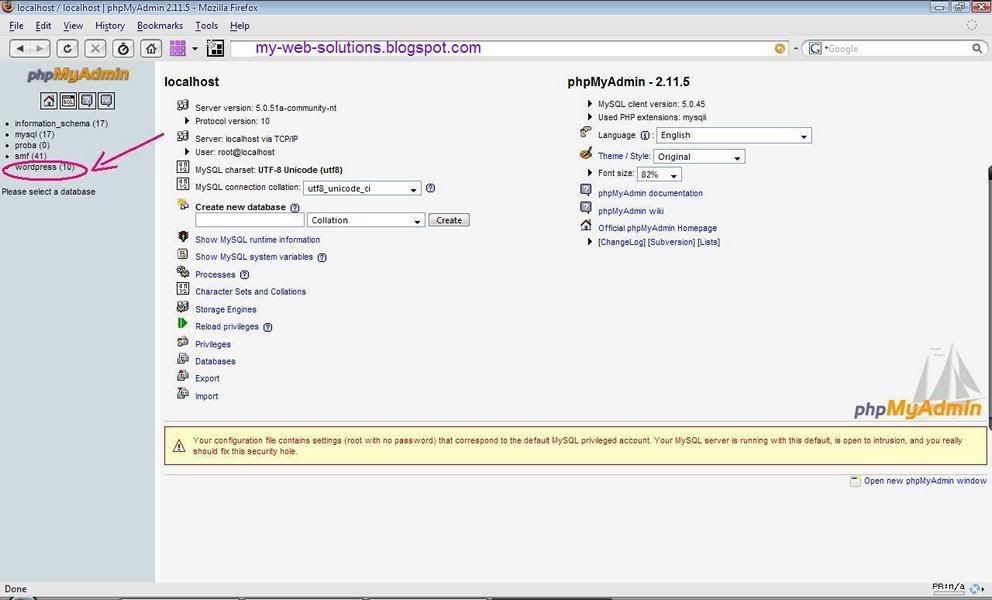
After you did that, on your left sidebar you will see all databases you use. Click on your Wordpress database like on Fig.1


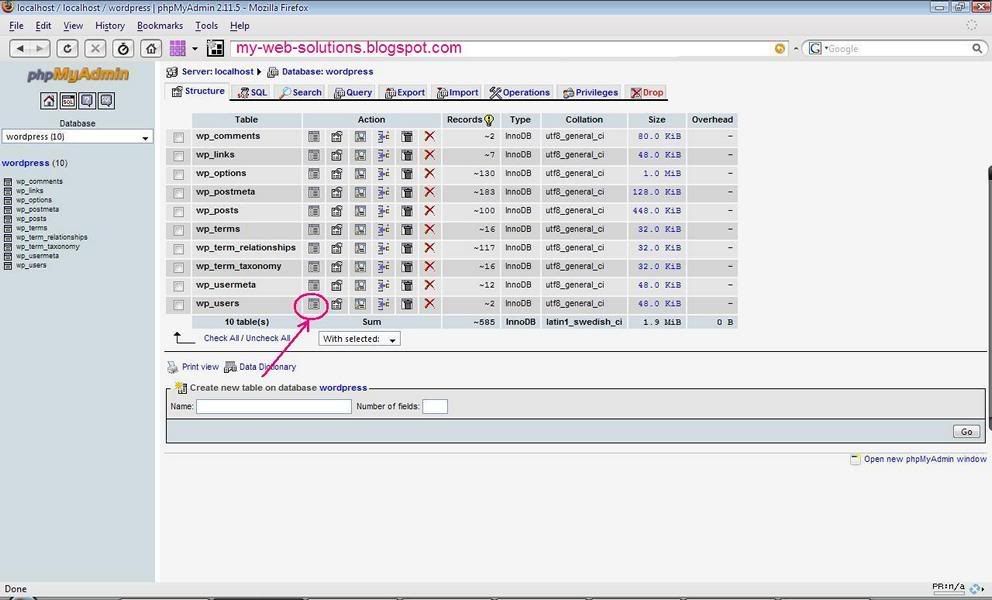
You will get screen shown on Fig.2. Click on the shown icon beside the wp_users table:


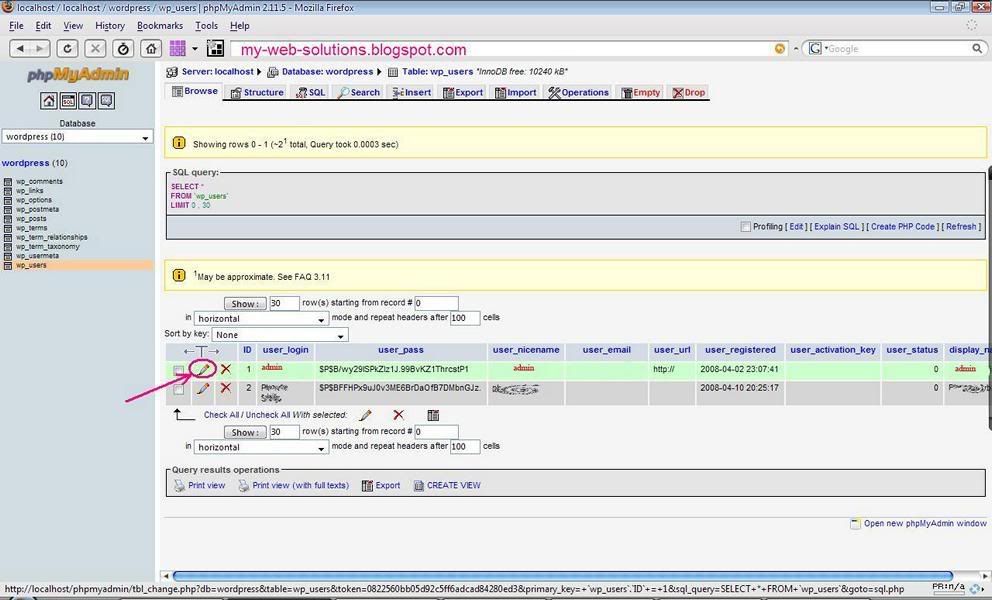
After you get screen shown on Fig.3 click on pecil icon for admin.


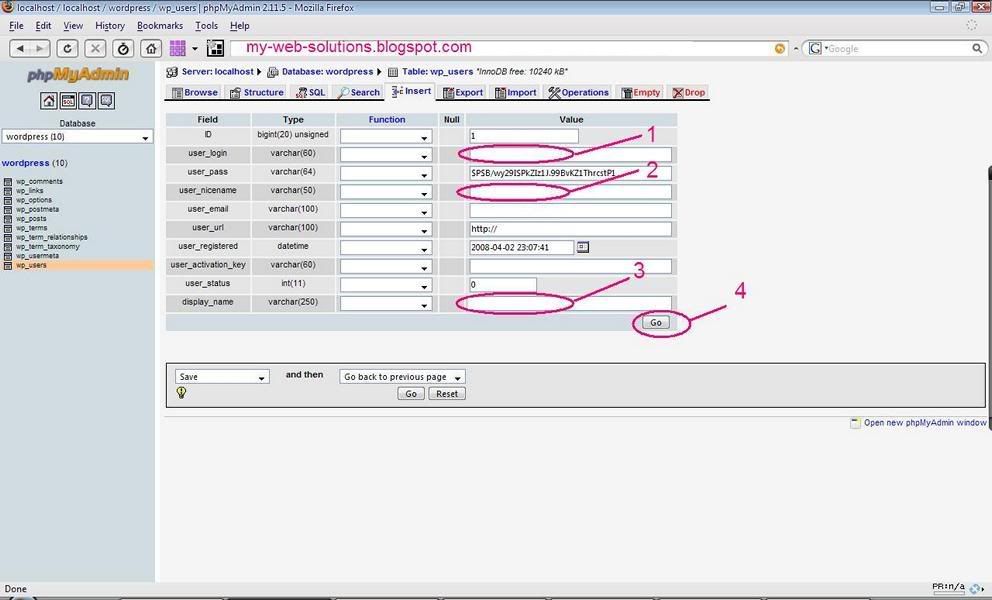
Now change fields 1, 2, and 3 (1 and 2 would be your new login, 3 is what is shown on your blog when you publih a post). It's not a bad idea to name 3 as something else (security reasons) so your real username would not be published to everyone.


After that click on 4 and that's it. Enjoy!

Read More......

WordPress RSS Category Feed

Posted by Planeta Srbija | 8.5.08 | | 1 comments »

RSS is getting more and more popular every day. People rather like to get informed about new posts instead wasting time searching blogs and sites for frequently updated content. People subscribe to RSS service by entering RSS URL into "RSS Reader", "Feed reader" or an web or desktop based agregator. But sometimes RSS can do more harm than good to your site statistics.

If you write about many different things on your WordPress based website you can imagine that not everybody is interested on all new posts on your blog. Most templates, if they have an RSS icon at all, don´t give this option for categories. But this is already built in function of WordPress! I just adore this CMS (content management system)- it has no limits and its so simple!

Subscribing to Categories:
It´s very unlikely that a lot of people are going to use this tricks by them selves. You will have to place somwhere on top of category an icon with hyperlink.

First, you have to know your category number. Click on any. You will get something like this: http://www.your-domain/?cat=16

Now,the format of RSS feed for this category would be:
http://www.your-domain/?feed=rss2&cat=16

If you choosed "custom permalinks" in your WordPress settings, you will have to use the complete path to your category, and the RSS feed will look about this:
http://www.your-domain/category/maincategory/subcategory/feed

Read More......

Skype secret smileys

Posted by Planeta Srbija | 3.5.08 | | 0 comments »

Skype is my favorite communication method with the "rest of the world" these days. Sometimes is a smiley better then a written word. Well, at least it´s more conveniant. There is a pretty small choice of emotions (smileys) within a regular Skype list, but you can use those hidden ones by typing following:


  • (mooning)
  • (finger)
  • (swear)
  • (rock)
  • (smoking)
  • (drunk)
  • (poolparty)
  • (toivo)
  • (bandit)
  • (headbang)
  • (fubar)
  • (tmi)
  • (bug)
  • (heidy)
  • (myspace)

(flag:rs) ... (flag:at) ... (flag:ch) ...

Read More......

Redirection

Posted by Planeta Srbija | 2.5.08 | | 0 comments »

Redirektion is "pull over" from one web page or web site to another.
You can use your Wordpad or Notepad to paste in a following code, save the file exactly as the old, not existing web page, or name the file "index.php" if you want to redirect from one domain to another:

<?php
header("Location: http://www.example.com/");
exit();
?>

If the page did not had the extension ".php" but ".html", then make a new .html page and between

<head>
.
.
</head>

insert following:

<meta http-equiv="refresh" content="N; URL=http://www.example.com">

and "N" stands for number of seconds until redirektion.


For redirect purposes you can also use this script. Put it above first
<html> flag, or between <HEAD> and </HEAD> tags:

<script language="javascript" type="text/javascript">
<!--
window.location="http://www.example.com/";
// -->
</script>

Read More......

Take a look on my other postings: