It's pretty easy one: you need to upload your .swf file to your server or somwhere else, but you need to know the link to it! Open the text widget in your WordPress and put this code into it:
<div align="center"><embed wmode="transparent"
src="http://www.your-web-site/../your-file.swf"
quality="high" pluginspage="http://www.macromedia.com/go/getflashplayer" type="application/x-shockwave-flash"
width="size in pix" height="size in pix"></embed></div>
Of course, insert the correct path to the file and desired dimensions (red part of code)
Showing posts with label Widgets. Show all posts
Showing posts with label Widgets. Show all posts
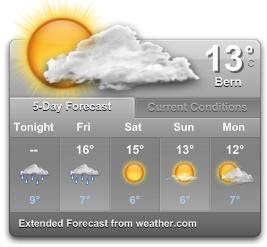
If your Yahoo Wigdet gets stocked showing old weather conditions you won't find a lot of help on Google or Yahoo-help pages. So it took me long time to solve the problem including reinstall of Yahoo-widgets.
Solution:
First make sure that your IE is not in "Work Offline" mode (File/Work Offline) - NO matter if you use any other NORMAL web browsers like Firefox, Opera etc. You can see youself that this thing matters, because if you try to change to any other location, you will get "No connection" message and no weather conditions will show up. So, go online with the IE.
Clean all temp and junk files on your PC
Go to Yahoo Weather Widget, open location menu (under current temperature) and Clear Current Location. You will get default location Sunnyvale, CA with current weather informatin.
Now you can select Change Location and find your favorite one (probably from the beginning of this story which got stuck) - and everything works fine.
There are so many widgets, but today I discovered a perfect one! You can add every single detail (year, month, day, hour, minute), you can add your logo and even a URL to your page (which is optional). And it looks very nice. Wigdet is here, made by widgetop. Just enter the details, copy the script code and paste it into your website or blog post. Enjoy!
Subscribe to:
Posts (Atom)